
2.3.4 Navigation matters
Every time my wife enters the basement, she feels a bit lost – car spare parts, old magazines and newspapers, instruments and many other useless things – all carefully "distributed" all over the place. If she needs to find anything, she′d better ask me, so she wouldn′t have to spend the rest of her life digging in this chaos!
When a Search Engine bot feels the same when getting to your website, it′s not going to contact you for more information. It gives you a bad mark in its notebook and leaves. That′s why navigation is almost as important for your website as proper keyword research.
Categorizing your website
Whatever the content placed on your website, it can and must be grouped. Say, you have a resource for ski lovers, then your website can have the following categories:
- Ski equipment
- Skiing resorts
- Learn how to ski
- Skiing news
These categories can have subcategories (Skiing resorts: Austria, Italy, Sweden, Germany, etc.), but please don′t get craze with sub-sub-categories. Unless you have a very information-rich resource, you won′t need anything more complex than a 2-3 level menu structure.
With categories, it′s much easier for Search Engines to read and understand your content. And for the users it′s more pleasant as well. So think ahead not to face the issue in the future.
Make different paths to reach a page
Think of our map and the Robot driver, again. If you can get to a city from two other places, chances are good that the Robot will get there. But if there are 6 roads from 6 different places, leading to one city, chances are much bigger.
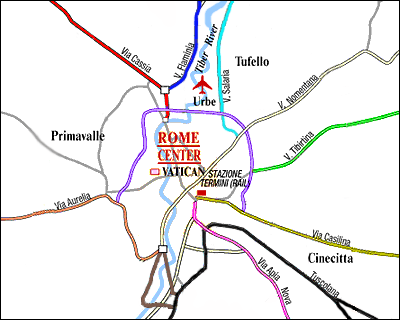
Different Roads Leading to the Same Place
So let's make as many paths as possible.
When you create a page, try to make links to other pages from it, where possible.
DO IT NOW! Categorize your content and interlink different pages of your website.
2.3.5 Use text links instead of images
Search Engines don't understand texts standing on graphic links: they're like abracadabra to the Robot. And, you should always make reasonable choice between a nice button and a text link like these:
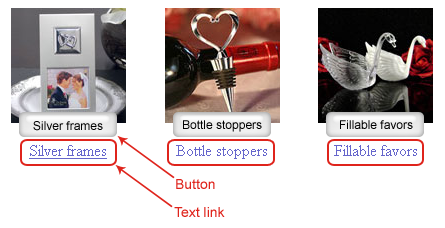
Examples of Buttons and Text Links
The button will look great on your page, but the robot won't read the text on it, though it can be very important. As for a text link, though it doesn't contribute much to your site's look, its text gets noticed by Search Engines' robots. Moreover, today's technologies, like DHTML or CSS, make it possible to create elements that look as great as images, but are easy to understand for Search Engines (you can check).
So try to avoid image links and replace them with normal text links, where the site's design allows it.
DO IT NOW! Check where it's possible to use text links instead of images, and replace them. After that, make these changes available on the web.



Answer
Answer
Answer
Answer
Answer
Answer
Answer
Answer
Answer
Answer