

2.3.6 Flash, JavaScript and frames
Look at these words: Flash, JavaScript, frames.
These three are so double–faced. They can make the design of your page look very nice, but quite often, for Search Engines they're as bad as broken links: just make no way to see what's on your site
For the Robot, JavaScript, frames or flash on a website are like direction signs on the roads in the ancient Greek language. They are just hardly possible to read, though Search Engines keep developing.
Traditionally, Google hasn't followed JavaScript, but now it's getting much better at using it for link discovery and can now execute some JavaScript and AJAX. However, other Search Engines may not be very good at it. The same concerns Flash. Although Google can now index text content contained in it, other Search Engines may not.
Maybe one day, bots will have no problems crawling these elements, but today's definitely not that day.
So if you want the Robot to crawl your site well (and you surely do!), you need to make sure these three flash, JavaScript and frames appeal to the Robot. And, if they don't, get rid of them or back–up these "Greek" signs with signs in normal language.
But first, how do you recognize frames, flash and JavaScript?
Frames
Frames allow displaying more than one HTML document in the same browser window.
Here's an example:
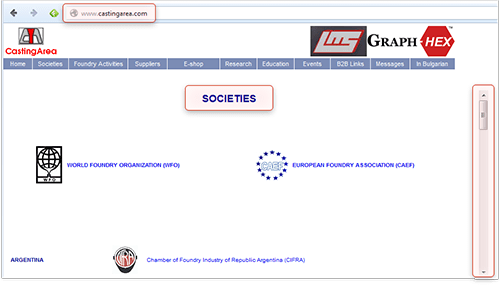
Example of a website with Frames
If your browser window's broken into one or more parts, and each one's like a separate web page, which can be scrolled independently, the site most likely uses frames. You can also detect such a website by clicking on different menu items and tabs and navigating through it. If the URL does not change — Bingo! The website you are browsing is built with frames! In the example above you can see that although we are in the "Societies" section, the URL in the address bar has not changed a bit.
There's one more drawback websites with frames have. As you've already learnt, Search Engines typically look for text that describes what each page is about, and for hyperlinks leading to other pages of your website, so you guess right! both of these are missing from a standard frameset document. Hence, if you use frames, Search Engines will fail to properly crawl and index your valuable content.
You can rebuild your site and remove frames completely or at least use the noframes tags. What are these? Noframes tags are special ones that help Search Engines easier crawl your page. I'm sure your webmaster knows this and will add noframes tags easily.
Flash
You just can't miss it. This is the graphic animation that's been so trendy recently, and most of the time, it's used without any purpose. (These animations are made with a tool called Macromedia Flash). If flash is used in navigational elements of your site, it does pretty much harm. Most often, web designers use flash to make an intro like this one: http://www.freeflashintros.com/flash/downloads/intros/star–warpspace.html
Why is flash bad? Because if you have some text in it, Search Engines won't recognize it (ok, Google claims to recognize it, but we, SEOs, do not rely on that too much). You can make amazing flash animation, and put a fantastic message in it, and use nice links with good use of keywords... But for Search Engines it will be just a set of images, no keyword–rich content or anchor texts, and absolutely no way for the Robot to know what your site's about.
So... if you have flash embedded in your website's navigation, you've got to think it may do you harm. Discuss it with your webmaster, and maybe you need to either get rid of it or just duplicate your navigation bar without flash and place it somewhere else, for instance in the footer, like here:

Footer links
JavaScript
First, check if your site uses JavaScript. Here's how you do it: open it in your web browser and choose View –> Source in the browser menu. Now use the Ctrl+F command to search for "text" like this: <script. There're several ways of how JavaScript sections may look like, but they all have these <script> and </script> tags.
So the <script> tags tell you that your site's using scripts. Again, like with flash, JavaScript can be harmful if it's used in navigational elements, like different menus.
Now, ask your webmaster if JavaScript is used in navigation. If the answer is yes, your website's ranking is at risk. There's no guarantee that the Robot will read the scripts correctly: from my own experience, robots don't crawl 50% of JavaScript. So to avoid trouble, ask the webmaster to eliminate the harmful scripts, or at least include the noscript section. Here's a general example of this kind of section:
<script language="javascript" type="text/javascript">
Some script
</script>
<noscript>
Some valuable content for spiders and javascript disabled browsers.
</noscript>
DO IT NOW! Detect JavaScript, flash and frames and make sure they're not causing you trouble.
Removing flash, frames and JavaScript from your website requires special skills. Well, in theory you can do it yourself, if you're familiar with web programming. But to ensure all's done correctly, my advice is: ask your webmaster to do away with these evil things — he'll definitely solve the problems with ease.
For your convenience, I've also included a list of the file types that can be indexed by Google:
- Adobe Flash (.swf)
- Adobe Portable Document Format (.pdf)
- Adobe PostScript (.ps)
- Autodesk Design Web Format (.dwf)
- Google Earth (.kml, .kmz)
- GPS eXchange Format (.gpx)
- Hancom Hanword (.hwp)
- HTML (.htm, .html, other file extensions)
- Microsoft Excel (.xls, .xlsx)
- Microsoft PowerPoint (.ppt, .pptx)
- Microsoft Word (.doc, .docx)
- OpenOffice presentation (.odp)
- OpenOffice spreadsheet (.ods)
- OpenOffice text (.odt)
- Rich Text Format (.rtf, .wri)
- Scalable Vector Graphics (.svg)
- TeX/LaTeX (.tex)
- Text (.txt, .text, other file extensions), including source code in common programming languages:
- Basic source code (.bas)
- C/C++ source code (.c, .cc, .cpp, .cxx, .h, .hpp)
- C# source code (.cs)
- Java source code (.java)
- Perl source code (.pl)
- Python source code (.py)
- Wireless Markup Language (.wml, .wap)
- XML (.xml)
Sure enough, these elements should be optimized as well, but let's not run before the hounds.
2.3.7 Remove the Welcome page
I guess you also saw a thing like this: you load a site and all you see is a picture saying something like "Welcome to this cool website." To come to the website, you need to click a link somewhere on the Welcome page.
Honestly, I hate Welcome Pages. Most Internet users hate them. And, the Robot hates them, too! Yes, even though he's a patient guy, welcome pages are getting on his nerves. And what about normal people, huh?
Making a visitor come to a Welcome Page is as weird as what I imagined now: say, you're going to Las Vegas, but before you come there, you have to stay for a day in a tiny place called "Welcome to Las–Vegas City" City, with no alcohol, no women and no casinos — and only then you can go to Las Vegas itself. Who would do that?!?
To cut it short, Welcome Pages only do harm to your website sales and irritate users. So if you have a Welcome Page and there's a way to kill it, don't wait to do that.
DO IT NOW! If you have a Welcome page, and it's possible to remove it — remove it!
2.3.8 Fix broken links
You know what a broken link is and how bad it can be? Well, I'll tell you.
About a month ago, I was driving to Walker River, NV. Just wanted to see the place, as my granddad came from there.
I only had a 20–year–old map of the place, and it turned out to be too old: On the way I chose, the bridge was broken quite long ago.
Well, I was a bit disappointed and had to take another road.
But what if it weren't me on the broken bridge? The Robot would try to find another way to go. But he's not that determined to visit all your pages. In the case of a broken link, the Robot may simply leave the page not crawled.
And what is actually a broken link?
A broken link is the one having some elements incorrect or missing from the link's HTML code, or a link that leads to a non–existing web page.
Now what you have to do is check your pages for broken links — and fix them.
DO IT NOW! Find and fix broken links on your web pages. Upload the changed pages to your web server.
Here's a free online tool to help you: http://validator.w3.org/checklink
Psst! There's one secret I have to disclose at the end of Chapter 2. It tells how to discover all of your website issues in a single click. Too impatient to learn? Then get to the chapter 2.3.12!



Answer
Answer
Answer
Answer
Answer
Answer
Answer
Answer
Answer
Answer
Answer