
5.3 Power charge and speed up your link building
I′ ve just provided you with lots of ideas and information about how you can get backlinks just being creative and consistent.
Option 1: Free Manual Link Building
Below are the steps you need to take if you decide to do link building yourself. If that′ s too much for you, you may as well jump to the second option where I describe a tool which can make the whole link building process much easier. But let′ s start from the basics...
Step 1. Find a potential backlink resource
The easiest way to find such resources is to search in Google for your keywords and similar phrases, using search operators
Currently, one of the most popular and effective link building tactics is guest posting. And that′ s what I′ ll tell you about in this chapter. However. using the methods I describe here, alongside searching for blogs offering guest posting opportunities, you may search for other resources to place a link.
Various bloggers use different words to invite guest authors. Some directly ask to "submit a guest post"; others offer to write for them. Here are just a couple of queries to search for guest post opportunities in Google:
- "Submit a guest post"/"Submit post"
- "Submit an article"
- "Suggest a guest post"
- "Send a guest post"
- "Become an author"
- "Guest bloggers wanted"
- "Become a contributor"
I recommend using quotes in a query to find most relevant results. For example, a query may look like this: travelling "submit a guest post".
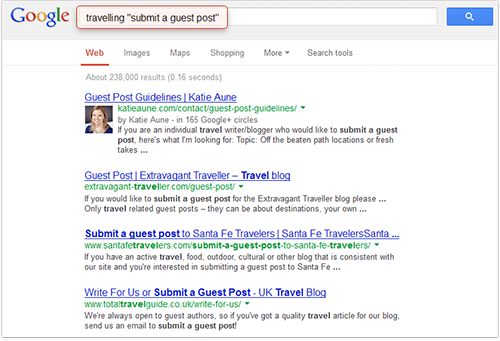
Some invitations can be slightly different. For example, a blogger may write "Become our contributor" instead of "Become a contributor" or "Submit your post" instead of "Submit post", but these blogs will be filtered out because the quotation marks instruct Google to search for exact match.
Therefore, if you don′ t want to exclude relevant yet a bit different results, you should use a wildcard operator (*) which gets substituted by one or more words. So if you search for "submit * guest post", search results will include:
- "submit a guest post",
- "submit your guest post",
- etc.
Besides, you can use the following combinations:
inurl:category/guest_your keyword will find the blog posts which have been categorized as "guest" and that also contain the keyword relevant to your site.
But if a blogger has not put all the guest posts in a separate category, there′ s another query you can try: inpostauthor:guest_your keyword will find the blog posts where there is an author called guest, guest post, guest contributor etc.
You may also combine several queries with synonyms, to get something like:
<Your keyword> + intitle:"Submit guest post" OR intitle:"Submit an article" OR intitle:"Write for us".
After that Google will come up with a list of websites where you may potentially host your guest post.
DO IT NOW! Go to Google to search for guest posting opportunities using different keyword combinations.
And don′ t forget to start a new Excel sheet to keep record of each resource. Enter the sites you just found, one per line (like I did in the sample list below).
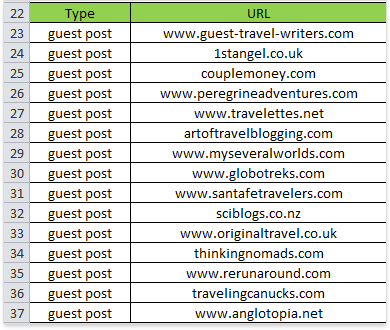
List of potential resources in Excel
Step 2. Choose only HIGH QUALITY, complementary sites.
You need to check at least those most important Q–factors I was talking about before that help you decide on the quality of links from prospect websites. As any of the choices we make every day, we have to choose link partners smartly.
Like when I was in Santana Row for a pair of black shoes, I didn′ t buy the first pair I saw. At least they have to be Size 11 width EX. Then do they match my suit? Does the leather look as it′ ll wear long? Does my wife Linda like them after all :) This all seems to matter.
The same is true for backlinks: Apply a number of factors to choose the right sites for links.
Besides the factors listed in Chapter 4.7, you may as well check others which are important for you. For example, I check the number of website pages in Google′ s index (the more relevant pages — the better), number of social signals and the quantity of linking domains (if other websites link to this resource, it is probably popular and useful).
Here′ s an example of what your spreadsheet may look like after you fill it in (all figures are imaginary!).
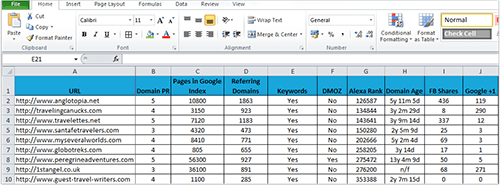
Sample partner list with Quality Factors marked
No doubt, searching for all these data and filling them in manually can be pretty boring and take a lot of time. If you want to spend your time on more useful activities, go directly to the chapter 5.4 "The winning tool that finds best link opportunities" and read about the tool which will do all that for you.
DO IT NOW! Look at your potential partners like you′ d look at a pair of shoes and decide if that′ s exactly what you need.
Step 3. Find contact details
In today′ s world there are two most popular ways to contact a blogger: e–mail or social.
With e–mails you are more likely to get a response although e–mail addresses are sometimes much harder to find. As most bloggers have social accounts and want you to follow them, they are easy to find on the Web. Below I′ ll describe several ways that may help you find out a blogger′ s e–mail address:
- First and foremost, try Google Search. If you know the blogger′ s name or username, Google may provide you with the necessary contact information.
- http://whois.domaintools.com/. Besides all of the basic information of a website, here you can also find the contact details. However, you should be aware that here you′ ll see the e–mail of the registrant of the site, who is not necessarily the author. Luckily, with blogs this would rarely be a problem.
Step 4. E–mail bloggers
E–mail the blogger a short, friendly note.
My recommendations on writing e–mails to bloggers
First of all, if there are precise "guest post" guidelines on the website don′ t even think of writing another letter just to introduce yourself and to say you′ d like to be a guest author. Do that only if the guidelines say so, because otherwise you′ ll just waste a blogger′ s time, not to mention your own.
Write a post in compliance with the guidelines and send it alongside short information about yourself and your website. This will demonstrate that you value the blogger′ s time and have spent a couple of extra minutes to examine the website you′ d like to post on.
If there are no such guidelines and you haven′ t found any articles written by "guest authors", you have no choice but to ask whether a blogger accepts guest posts at all and what he wants in exchange.
As you′ re offering a blogger valuable content, make sure it is conveyed by the e–mail. Do not pitch it as a favor.
As for the subject lines, use something like: "Guest Post on [blog name]", or "An infographic that may be of interest to you"or "Content suggestion for [blog name]".
You e–mails should be personal. If possible, address the blogger by name. Don′ t write too much and if you can genuinely praise something on the site, please do. Tell a blogger why placing a guest post will be beneficial for the both of you — this helps you look more personal and trustworthy. After reading your e–mail a blogger should have a clear idea of what you need and what you offer in return.
Here′ s an example of such an e–mail.
Hey [name],
I recently came across your website and read the post about your last trip to Thailand.
I really liked the photos you made and all the useful advice you provided on how to see the world and spend less money.
I am a traveler too and I′ d be glad to share my advice on how to save money when travelling.
I′ m thinking about a post named "15 Free or Cheap Ways to See the World".
Please let me know if this sounds interesting. If not, I can send you other post ideas.
Cheers,
[Your name]
If you are requesting a review, you may use the following line:
"I would love it if you could take a look at [your software tool]. I think that a review would be a perfect fit for your blog and audience.
If you are interested, I would be more than happy to send you a free copy of [your software tool]".
However these are just samples, to show you the main points that are good to mention in an e–mail. But I′ m sure you′ ve got your own tricks to convince people into doing you a favor. And let me repeat once again, as this is really important. Be personal when you e–mail bloggers.
You should understand that guest posting is a win–win, so you need to have something to offer, to get a link back. Of course this "something" can be a high Google PageRank, or good traffic flows — but in our case the #1 thing that matters is quality content. If your guest post is useful and might be valuable to the visitors of a Jack′ s site, the Jack might pretty well link to you — why not?
And don′ t ever get desperate at the very start. It′ s never easy, but as soon as you get over the beginner′ s challenge, you′ ll be surprised at how fast you gain speed.
Step 5. Put the site into your record
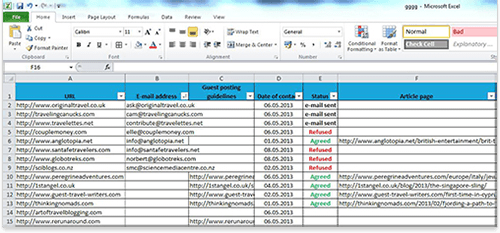
Keep record of sites you′ ve found. Start an Excel sheet and put down who you′ ve contacted and who you haven′ t yet, who agreed and who refused to post and so on — as you′ ll be getting down to these records all the time. With hundreds of potential blogs, you may easily send two e–mails to the same person by mistake, or forget to send a couple e–mails — so keep records to avoid this.
DO IT NOW! Start from looking for new backlink resources and select the best ones.
And as ever, there are ways to make any job faster and easier. This time, software′ s at your service to make link building as easy as winking.



Answer
Answer
Answer
Answer
Answer
Answer
Answer
Answer
Answer
Answer