

1.2.2 Shortlist your keywords
Now you have a long and versatile list of keywords and keyphrases to choose from.
So let′s brush aside all stuff and shortlist your search terms. Again, you can choose between a free but long way to do this, or use Rank Tracker tool you already know to make this task a snap.
Option 1: Sweep away the keyword trash, by hand
Calculating KEI
Here we go with the magic wand of SEOs. That′s the SEO know–how called KEI, or Keyword Efficiency Index. This index shows you how good a keyword is for bringing traffic to your site.n
Here′s what the importance of your keywords depends on:
- Relevance (R): it is how closely your keyword is related to what you offer to your customers.
We use the three–grade scale to estimate relevance. So now you need to make a separate column for Relevance in your spreadsheet, and put one of the following numbers next to each word or phrase:
- 1 for Excellent
- 2 for Good
- 3 for Poor
- Search Volume (SV): it is how many queries are made for a keyword per month.
Here′s how you can check Search Volume for each word or phrase in Google AdWords. Let′s say you want to check it for "free ecard":
- go to Google AdWords Keyword Tool or use Google Keyword Tool by Rank Tracker
- copy and paste the selected keywords
- select the desired match type on the left (I′ll explain the options in a second)
- select your region, language and devices you wish to scan the traffic for, wait a little bit and VOILA! you are now armed with the monthly search volumes for your keywords.
As promised, below is the description of the available match types. If you′ve already used Google Keyword Tool or simply know how they differ from each other, just skip this paragraph.
- So, broad match type is the default option. For example, for the query "free ecard" you′ll see the number of searches, containing either or both words "free" and "ecard" in any order, possibly along with other relevant terms. This number may also include singular/plural forms queries and synonyms.
- Choosing [Exact] match you′ll see how many times per month the keyphrase is searched exactly as it′s entered by a user.
- And, finally, the "Phrase" match will reflect the number of queries where words are in the same order as in your keyphrase – even if other words are present in that query. For example, the number of searches for "free ecard", will also include keywords like "free ecard happy birthday" or "free ecard funny".
If you are not an international business or by any reasons are not interested in the numbers of search queries from all over the world, select the necessary country in the Local monthly searches column. Note, that these figures may not be exactly accurate, but reflect general trends.
Now, in your spreadsheet, make a column for Search Volume and enter the number of search values for each phrase.
- Competition (C): that′s how many websites try to rank for this keyword. Generally, all sites that have the same keyword as you are your online competition. And the fewer websites are optimized for the same keyword, the better KEI this keyword has.
The way to check competition is simple. Enter the keyword in Google and click to search. Now look at the image below to see where you find the Competition value:
 Google competition for the free ecard keyword
In a separate column for Competition in your spreadsheet, enter values for each keyword.
Here′s an example of how your keywords table may look like:
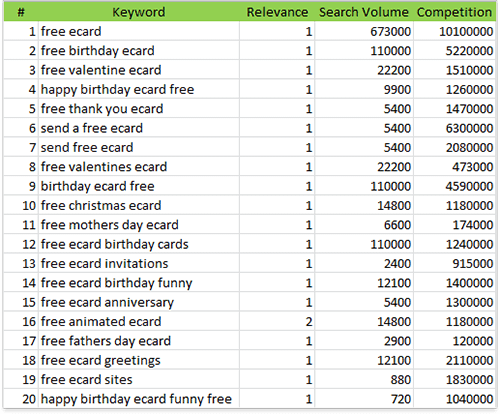
Relevance, Search Volume and Competition Values in Excel worksheet
Now, let′s count the magic KEI number for your keywords.
The classical formula for KEI looks like this:
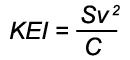
Keyword Efficiency Index formula
Sometimes I also use an improved formula for better estimation. It takes into account real relevance of your keywords.
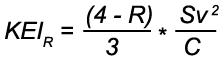
Keyword Efficiency Index with Relevance
Now make a column for KEI in your Excel spreadsheet and apply the second formula to calculate KEI for each phrase.
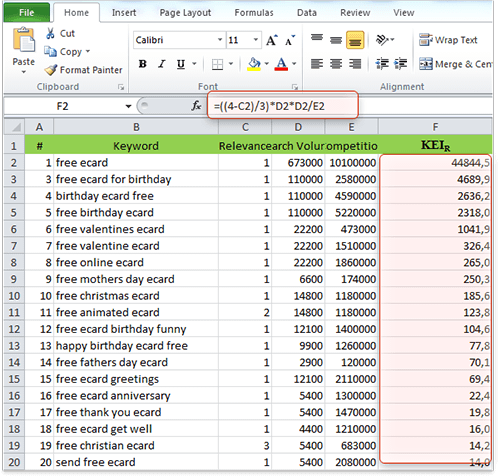 Keyword Efficiency Index in Excel worksheet
Let′s choose the best keywords
First, sort all keywords in your spreadsheet by KEI. As I already said, the higher KEI, the better your keywords.
You do not need many keywords to optimize your site for, so look at your list and choose top 5 keywords. Mark them as the major ones (say, color them green.) Then, choose the following 30 and mark them as important (you can color them yellow.) Some more 65 or so keywords should be marked as supplemental (e.g. red.)
Now you′ve got a nice list. We′ll target the green–marked keywords in the first turn, make use of the yellow ones as alternative and mind the red ones just in case.
Looks complicated? It definitely does, that′s why I′ll provide you with a quicker and easier way to perform the same check automatically. Stay tuned!



Answer
Answer
Answer
Answer
Answer
Answer
Answer
Answer
Answer
Answer