Register
Forgot Password?
Score
-
-
-
  /100
Certificate
SEO Certificate


Share

Option 2: One click to choose the best keywords

Sorry, you are not logged in. Please login to get full access to this page or register if you're not registered yet.

Yes, the time comes to see how keyword software makes the final decision swiftly and gracefully. So I'm anxious to say, it's already there. Rank Tracker is done with keyword research — and with the choice as well.

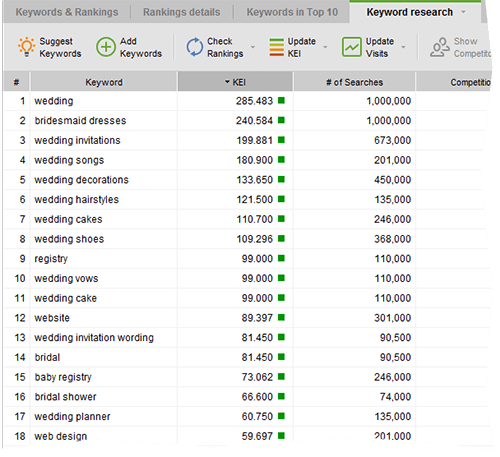
Let's have a look. On the right of the keyword tool's window, find the combo box with workspaces and choose Keyword Research View. Now you can see a column with KEI. In this column, the tool has put a color marker for each word, ranging from green to red.
Keyword Efficiency Index In Rank Tracker SEO Tool
Keyword Efficiency Index in Rank Tracker

So, What's KEI and Why Do We Need It?

As I already told you, KEI, or keyword efficiency index is an SEO know-how. It shows you how good a keyword is for bringing traffic to your site. Or, putting it simple, how much positive effect keywords have on your paychecks.

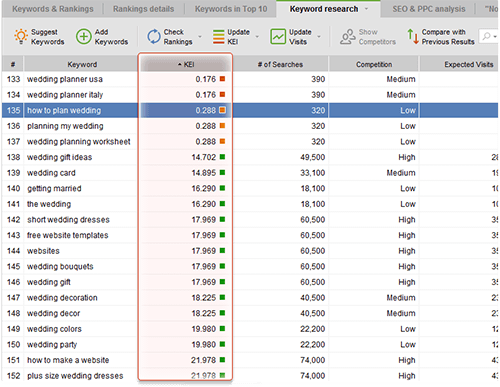
You need keywords with high KEI. The greener the marker is in Rank Tracker, the better the keyword. So just sort keywords by KEI (click the header of the column), and separate the best keywords from non-worthy ones. And, you can just remove the keywords having bad KEI.

Keyword Efficiency Index In Rank Tracker SEO Tool
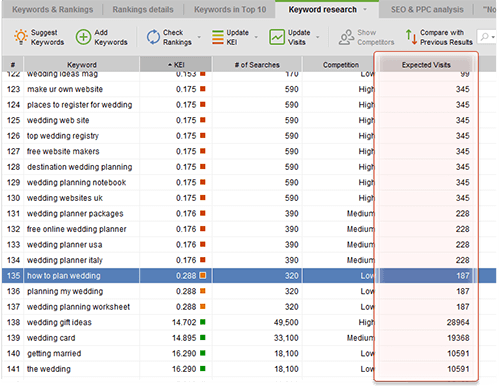
In the beginning choose keywords with "green" KEI

Leave about 100-130 keywords. First, pay attention to the top 5 ones. You'll use them a lot to optimize your website. The next 30 will be a good alternative, say, to create variations. Then, the remaining terms are good enough and should be there just in case.

DO IT NOW! Calculate KEI for your keywords, sort them out and choose 5 best keywords, 30 alternative ones, and leave 65 more to be able to create more variations.


Let's sum it up. You will hardly realize it at the moment, but now you have a list of premium quality keywords that are worth a fortune. As a next step, we'll check where your site ranks for these words. To put it simple, let's find our starting point.

77 comments

Add comment Hide commentsShow comments

Please log in or register to leave a comment.

2008-07-31 16:46:26: Adrian Beadell

Well.... you will get this info IF you BUY the "free" tool !!!

Answer
2010-11-17 09:19:54: Sebastiaan Hendriks

Trust in Rank Tracker it's a huge time-saver...

Answer
2011-08-19 11:41:07: Jennifer Alston

You don't need to BUY the Rank Tracker, I downloaded the FREE version of the complete software, SEO PowerSuite and I have the full version, with the KEI included.

I would suggest downloading the entire suite for free.

Answer
2008-07-31 17:14:09: Gerben Bouwhuis

@adrian,

You should really buy it. it's a big help, especially for comparison of your trackings!

Answer
2008-08-01 08:46:13: Dan Richmond

@Adrian Beadell:
I thought I was fair. Whatever I advise you to do, I'm describing a FREE option along with a quicker paid option.
I do trust in Rank Tracker and it's a huge time-saver, that's why I recommend it.

Answer
2008-08-02 03:59:59: Guenter Buch

This is also my experience.
Do to the time I use rank-tracker, I save a lot of time and increase my conversion rates.
Just give this tool a try...

Answer
2008-09-23 17:48:56: satish kumar

Can you recommend me in choosing the number of keywords, or atleast the maximum total keywords length. I even want to know whether to give a comma between keywords or better to leave a space(as we get more keyword combinations).

Answer
2008-09-24 05:37:41: Dan Richmond

As I'm explaining here:
http://www.seoinpractice.com/start-keyword-research.html#1_1
it's all relevant. (Pay attention at the diagram.) If your keyphrases include two words, they will be searched for more often. But they won't be as precise (read tartgeted) as longer phrases.

As for the comma, people searching in Google are very unlikely to enter their query with commas, and (with very rare exceptions) Google won't differenciate between queries with and without a comma. So my answer would be, if you need a comma grammatically, use it. If you don't then don't.

Answer
2008-09-24 09:34:23: satish kumar

Hi, Thanks for the reply.
I mean comma between each keyword.
For live example keywords for my movie downloads site:
Shall i use keywords tag as "movie download, download movies, free movies download"
or
"free movie movies download"

In the first case download word is repeated thrice, where as in second case with four words more number of combination's can be made right?

On the whole is it ok to separate each keyword with space's or need to place comma's.

Answer
2008-10-13 05:39:12: jonny flores

Going with the last comment, I too am wondering about the placing and spacing of the keywords? Any advise on this maestro?

Answer
2008-10-13 12:52:35: Dan Richmond

Hi,

if that's gonna sit on your webpage, then my common sence says it's better either to use commas or to write "free movies download" rather than "free movie movies download". Firstly, people will see this. Secondly, search engines may also frown at keyword overuse. But that's a different point already, called over-optimization. That's why I recommend competition research for onpage optimization (WebSite Auditor does this well) - to see what's good in your niche.

Answer
2008-10-17 16:39:13: satish kumar

Thanks for the reply Richmond,
What about my last question? Do we need to separate each keyword with space or need to use comma in keywords content?

Answer
2008-10-20 05:28:37: Dan Richmond

I thought the answer's already clear:) Put commas where it's required by grammar.

Answer
2009-04-02 13:25:51: Adam Lavery

Question: on the previous page you presented an alternative KEI formula that includes Relevance. Makes perfect sense. But from the Rank Tracker screenshots, there's no indication that Relevance can be added to your list of keywords. So how does Rank Tracker account for Relevance? Seems quite important in ensuring the keywords with the best KEI are actually relevant.

Answer
2009-04-03 10:05:37: Dan Richmond

@Adam Lavery
Unfortunately to make the software determine relevance you would need to develop artificial imtelligence, which even Google hasn't done so far :)

Answer
2009-04-07 09:15:12: Adam Lavery

That would be cool! But I was thinking more on the lines of manually adding relevance to the list of keywords so the tool results would be more accurate and beneficial.

Answer
2009-04-09 08:04:05: Dan Richmond

@Adam Lavery

Thanks for your suggestion, Adam, I'll pass it on to the developers. But just to be sure it gets on the users wish list drop a comment on the Rank Tracker forum I'm pretty sure the feature will be approved and implemented.

Answer
2009-06-09 12:51:37: George Walker

Wow, this looks really cool. My site at www.creditcard-debtsolutions needs help so I will try all your tools and see the results.

Answer
2009-06-19 11:49:16: Magnus von Bromsen

This book is good. Very good.
But one question: Where do I find "number of searches" for a word not in english (but in swedish). Rank Tracker reports 0, Google keyword tool "not enough data" and Wordtracker free tool "No result found..."

I can't calculate the KEI without it :(

Regards, Magnus

Answer
2009-06-26 09:56:38: Dan Richmond

@Magnus von Bromsen

Right now there's only one more or less reliable online tool that is able to find search volumes for non-English keywords - Google AdWords keyword tool but the developers will need some time to add it to Rank Tracker. As far as I know this will be added in a couple of weeks and as soon as it's ready you will be able to check # of searches for non-English keywords.

Answer
2009-10-06 20:21:36: Dirk Weemaes

Hello,
for 60 of my keywords the KEI is not calculated because I keep getting 'no data' for the # of searches.
I have repeatedly tried to recalculate the KEI but it does not solve the problem.
Awaiting your news.
Best regards,
dirk weemaes
http://www.sabandari.com

Answer
2009-10-08 03:15:21: Dan Richmond

@Dirk Weemaes

Dirk, please email me at dan@seoinpactice.com with your website URL and keyword list. I'll check what's wrong.

Answer
2009-10-08 04:36:04: Dirk Weemaes

O.K Dan I have sent out the requested information.
The address given bounced but I added the 'r' ;)
greetings,
dirk

Answer
2009-10-08 04:57:23: Dan Richmond

; Thanks Dirk! Looking into it.

Answer
2009-11-14 10:17:17: Andrew Hughes

Hi Dan,

I'm now starting to get to grips with my Rank Tracker software having tired the free version for a month or so. I've been trying to compile a list of key words and use the KEI but I'm having the same sort of problem as a couple of those above have mentioned.

I'm in the UK and I'm trying to get a list of key words for web design in my local area. The results returned mostly say "no data" or "forbidden". This makes the choosing of efficient keywords almost impossible. Do you know why this is happening or how to get round it.

I've posted a ticket to the folks at Link Assistant but their 24hr response hasn't quite materialised yet. Any help you can give would be much appreciated as I need the KEI to work properly to feel sure I'm optimizing for the right keywords.

Andy h

Answer
2009-11-18 11:23:47: Dan Richmond

@Andrew Hughes

As far as I remember this problem was known back in the late summer and has been fixed. You need to make sure that you're using the latest version of Rank Tracker. You can download the fresh version here: http://www.link-assistant.com/rank-tracker/update.html

Also, if the problem persists (though it should not), try checking keywords in smaller portions (10/15 KWs each time) and enter the captchas correctly if the software is asking you to.

BTW, they told me at LA's support that they cannot find any recent tickets from you...

Answer
2009-11-19 16:14:52: Andrew Hughes

Dan,

I've had contact from LA to ask me to send them an error log from Rank Tracker, which I've done. No response yet, but I'll keep you posted. I've now tried to generate a list of keywords for the UK a few times and each time it's the same.

Out of interest, you mention checking words in smaller quantities. I'm not quite sure how you mean. When I start a project, the first step is to insert a webpage url and then a keyword. After it checks the page I then hit the suggest button and the program sets about generating words. I've no idea how to limit the number of keywords it's suggesting.

Can you explain further?

Answer
2009-11-24 11:30:07: Dan Richmond

@Andrew Hughes

After it simply generates the suggestions, it goes to check them. Hit "Stop" to skip checking - then your keywords will simply be added to the project. After that, select them in smaller portions and make checks.
(But I believe the support folks from LA will give you a more up-to-the-point assistance).

Answer
2009-11-24 16:47:37: Colin Joss

Hey Dan,

I'm having the same issue as Andrew H.

I've kept it simple. I'm using the keyword 'commercial photography'. I don't use the suggest tool - I go straight to the check tool then KEI.

# of searches is returned. But competition and KEI remain blank.

Any idea why?

Colin

Answer
2009-11-27 07:21:18: Dan Richmond

@Colin Joss

I'm just copying the answer that Tech support forwarded to me. This one pretty much explains everything:
--------------------------------------------------------
The competition gets extracted directly from google.co.uk .

It looks like you have been temporarily blocked by the search engine
for excessive querying. In fact this is a very common issue and any
SEO software would get you temporarily blocked eventually. Search
engines consider excessive querying from one IP address suspicious and
block it from searching. The block lasts up to two hours and is in no
way harmful for you, your website or your business.

You can read more about the nature of that in our knowledgebase
article on SEO SpyGlass:

http://www.link-assistant.com/support/index.php?_m=knowledgebase&_a=viewarticle&kbarticleid=34&nav=0,15

Unlike other software providers, we are securing ways to avoid
temporary blocks:

- human emulation
- user agents
- proxy rotation

Using human emulation alone would in most cases be enough to stay
block-free and search without limits. As an immediate solution
(without waiting for an hour or so we recommend using a proxy server
or the proxy rotation feature.

Please go to Preferences/Search safety settings and enable human
emulation.

Kind regards,
Dennis
--------------------------------------------------------

Answer
2009-12-03 04:29:01: Paul Wallace

HI I seem to have trouble with this bit, am not sure if its as I am trying out the programme. I am able to get 10 of 15 KEI, but then dont seem to be able to get anything only competition volume unless I restart the whole thing and what a bit. And loose all the data.

Or may it be something else?
Thanks
Paul

Answer
2009-12-07 03:53:12: Ken Taylor

This is great stuff Dan. I've been going after KWs using just 'high search' - 'low competition'. What I plan to do is make a site factoring in KEI (you did say it was one "factor") and see how things turn out. My only turn-off is if I have 3 or 4 KW's that are four word phrases I'm going crazy typing in CAPTCHA every 15 to 20 seconds for almost ten minutes.

I do get some great results.

Is there a way I can use RankTracker without having to type so many CAPTCHA's?

Thank you.
Ken

Answer
2009-12-15 04:22:28: Dan Richmond

@Ken Tailor

Google AdWords Keyword Tool requires captchas when you're searching for KEI. The developers seem to have partially overcome that in the last week's update.

Answer
2009-12-28 07:38:26: Paul Watchorn

I am not used to this type of software, so just for the sake of speed, could somebody please tell me about the little green triangle. It appears on the top bar sometimes.

For instance in the example above showing the screen shot, on the KEI tab the green triangle precedes KEI.

I have been doing test runs in the freeware to get used to the system, and this green triangle comes up all over the place.

If it is clicked on, different things happen, but I can’t put my finger on what actually happens, sometimes the whole list changes, (like I say, I am new to this).

Answer
2009-12-29 08:34:51: Dan Richmond

@Paul Watchorn

The green triange in the column header tells you that the records are sorted by that column.

Answer
2010-01-04 15:39:01: Paul Wallace

Hi Dan,

I am trying to get Kei's but I dont seem to get any, as most of the time either only the number of searches or competition comes up.
I have all the human emulation set up too.
Any ideas?
Is it something to do with being a demo version?

Thanks
Paul

Answer
2010-01-05 10:33:26: Dan Richmond

@Paul Wallace

Hi Paul,

no, it's not connected with the demo version. Could you contact the developer's support with that problem? I am sure that they will help. Please go here to submit a support ticket:
http://www.link-assistant.com/support/

Answer
2010-03-31 01:21:15: Noman Ahmed

Thanks for interesting tools

Answer
2010-04-08 11:14:19: Dave O'Riordan

Hi Dan
I'm plodding through the free edition of Rank Tracker and am wondering if the "Keyword Research View" only operates in the paid for version as when I select it nothing happens.

Answer
2010-04-08 11:16:44: Dave O'Riordan

Sorry about that I Jumped the gun!! sorted..

Answer
2010-08-12 20:00:30: Leon Danilov

Hi Dan!
At first, thank you for so interesting and clear information.

my question is.
Why search queries of my site in google webmaster tools and list of keywords in Google's Keyword Tool relating то the same site is different? How Google's Keyword Tool defines the list of keywords of the site?

Answer
2010-08-31 16:57:27: Make Money at Home

Hey guys

Is it not too much competition (715000) for those keywords to appear in green?

Answer
2010-09-01 10:53:25: Dan Richmond

Well, if the number of searches is so big that it "outweighs" the petition then yes, it can have a good KEI score. Basically good KEI for very competitive keywords means that although the competition is very tough and you will need a huge budget to be on top for that keyword, BUT once you're on top the revenues will be most rewarding.

Answer
2010-10-14 08:03:49: Maxim Terehovich

You need to add page rank of top site to this formula to understand what you can do with list of keywords

Answer
2010-10-28 20:58:20: Thomas Graf

Hi Dan,

sorry, I don't get the page ranker. How do I get the KEI and KEEP it available?

If I click on SUGGEST then I get the KEI list in a separate window. But if I continue, it calculates the ranking (which actually doesn't work, see my other comment) and I can't see the KEI list anymore.

Then when I click FINISH this window closes again.

Then I again I can't see the KEI list with the green, yellow and red boxes.

Please help...

Answer
2010-10-29 10:19:33: Thomas Graf

Hi everybody,

unfortunately I still have not received an answer. I tried it again today - it is even worse.

I have a list of keywords and I click on "Update KEI" - after I have marked keywords. But then I only get the message that the KEI for these keywords has been updated.

But I don't see any KEI... :):):)

Please help.

Answer
2010-11-10 12:15:53: Dan Richmond

You should switch your workspace (top right) to "Keyword research view", please try that.

Answer
2010-11-10 12:19:50: Thomas Graf

Thanks Dan. I received a message from your colleagues in the meantime that there was a technical problem with Google some days ago which is solved now.

Answer
2010-11-10 12:23:10: Thomas Graf

I would still be interested in the logic behind your advise to build keyword combinations such as "Wedding Australia".

If your main keyword is "wedding" and if "Australia" has a high KEI - why should "wedding auctralia" also have a high KEI and therefore be used to optimize a webpage?

I can build beautiful combinations of my main keyword with other high-KEI-keywords, but the combination doesn't help at all if no one searches for it.

Do you see it differently?

Thanks you and best wishes
Thomas

Answer
2010-11-10 12:48:02: Dan Richmond

Well the point was that the main keyword is "wedding", but since it has insane competition you would want to narrow it down to "wedding Australia", because Australia is where you do business and it's your market. At the same time "wedding Australia" turned out to be a high search volume keyword, that is why it is a high-KEI one. Not just any combination will work but the one that specifies a general competitive keyword the way that reflects the actual people's needs.

Answer
2010-11-10 17:54:38: Thomas Graf

Thanks Dan. But still your approach confuses me.

You say that we should choose keywords with high KEI because here the search / competition ratio is good.

But that doesn't work: If for instance your website is in the education sector, according to your logic you would simply take UNIVERSITY as keyword and use it again and again. It has a super KEI.

This is how I understand your logic ("use page ranker and take the first 5 key words"). But your website will not get among the top-100 even though you used a keyword with high KEI.

Instead it may make sense to use other keywords with LOWER KEI but more specifically related to your content. But this other factor "specific relatedness" is something that no one can tell you. You have to be creative and combine keywords so that they are specifically related to your site - then check their KEI and take those with the highest - and hope that it works. But the KEI itself doesn't seem to help me at all.

So the logic - simply take the top KEI keywords - doesn't seem to make sense. Could you explain more what you mean, please?

Thomas

Answer
2010-11-15 09:40:58: Dan Richmond

I do not really insist on taking ONLY the high KEI keywords. What I wrote in the previous chapters is "localize your keywords" and "make sure they are specific to what you sell". Surely specific and localized keywords have lower KEI than the general ones. Simply the "free ecard" example already contains specific keywords and at the same time they have high KEI. If I insisted on taking ONLY the highest KEI keywords then I would suggest to optimize the free ecard website for "sex" and "cars" in this chapter :) The idea is to generate a list of relevant, specific, narrowed-down keywords, and then check their KEI, choosing the highest-KEI ones for your site.

Answer
2010-11-15 10:37:00: Thomas Graf

Makes sense. Thank you for clarifying!

Answer
2010-11-26 14:41:51: brian johnson

Dan,


Does it make sense to use this process to develop good PPC campaigns? I have used Google's tools and done word combination's by hand for years. My agency's specialty is local search and local lead conversion. We spend hours setting up local modifier combination and misspellings. Rank Tracker seems to be worth the money for that alone. However, do you think this software and process is also good for developing quality granular PPC ad groups?

Answer
2010-12-15 14:48:12: RANSON LASELL

I have over 300 of 400 keywords that gets NO DATA with the KEI results. What should I do about that

Answer
2010-12-22 22:46:08: rod seeber

do i need to have excel on my computer (currently i don't have it) to be able to use rank checker ?

Answer
2010-12-23 23:59:22: chanel Tan

The Rank checker is simply superb!
I am using it and i see so much keywords i didnt know.

Answer
2010-12-24 12:52:19: Miranda Matthews

Hi Dan,
I have the prof version of all four tools. I'm a little confused exactly how to choose the best keywords. I understand separately what KEI, competition, and # of searches concepts are, but am VERY confused which statistic to use. I understand that my niche markets are VERY competitive, so I really need help determining the proper kw to optimize my site. What # is considered to be low competition? How do we determine what is considered low and high for all three factors?
If I understood these basic #'s I am sure I can grasp this much better!

Answer
2011-01-11 13:57:05: Make Money at Home

Hi, Miranda

I am Ivo

These 4 tools are great, but you must think more deeply about the keywords.

You can see for free how to do that on my website here:

http://www.MoneyOnlineTreasure.com/making-money-on-line-finding-keywords.php

Have a nice day :)

Answer
2011-01-05 10:06:09: Eric Moschos

Hi,

I have a question regarding the stats "of Searches" in the Rank Tracker. Is it last months figures or is it last year? We have a product which varies some during the year that's why we need to know how this has been calculated.

Best Regards,
Malin

Answer
2011-01-22 01:46:07: Alessandro Brunelli

I don't see why "free ecard" should be used since it has so much more competition than searches (I see the same for all other keywords). Probably I misunderstood the concept for "Competition": is it the number of websites using that keywords? (I understand the mathematics and the KEI ratio, though; must have faith in the software for now. Must go back an re-read the two previous pages)

Answer
2011-04-07 04:25:16: Edwin Rude

A multitude of years ago I emailed Sumantra Roy and asked him about KEI. There was one question I neglected to ask, and therefore a question he did not answer: Obviously when someone inputs a search term the SE reports a number of results. Which set of results do you prefer to use - those derived from search terms enclosed within quotation marks, or those without quotation marks?

Thanks,
Ed

Answer
2011-04-07 14:32:11: Front Doors

Wow. I now have a list of premium quality keywords that are worth a fortune. I hope. All these keywords, and what do I do with them. I can't wait for the next page. Thank you for making it seem so easy.

Answer
2011-04-12 14:21:41: Joseph L

hi
i am using the free download and am seriously thinking of purchasing rank tracker. what does estimated visits mean please?

Answer
2011-04-23 08:31:20: kamal todary

i keep getting no data for the KEI and also N/A for the competition , please help

Answer
2011-05-10 10:14:36: Dan Richmond

Sometimes the keywords really do not have any data at Google AdWords, that usually happens with rarely-searched-for words. You can see if there is data for your keywords manually in the browser version of the tool: https://adwords.google.com/select/KeywordToolExternal

Answer
2011-06-01 00:29:36: Travel Club

The KEI is one of my favorite features of Rank Tracker. I was also wondering about the "estimated visits". Is that per month if you are in the #1 position?

Answer
2011-07-03 02:12:23: boudewijn lutgerink

Hi Dan,

I find your approach VERY useful for my sites. I just wonder how to determine the relevance of a keyword/phrase.
Do you have any hints on that?

Answer
2011-10-11 10:44:42: Dan Richmond

If you're talking about logical relevance then it\'s only up to you and your command of language to determine the relevance.

Answer
2011-08-19 11:43:31: Jennifer Alston

Hi Dan,

This is amazing. I have been researching, experimenting and using SEO for a few years since working for a web design company. I just found your book today and I can't stop reading, it's very easy to follow along, interesting and I love "hands on activities". I would recommend your book (course) for anyone who has the desire to learn SEO or use it as a business.

Thanks!

Answer
2011-10-10 16:23:40: Sam Barnhart

Silly questions but ive never received the same answer twice so Im going to run it buy you. For works with caps like states abbreviations PA pa Pa. It it necessary to have all three ways or just one? If so which one?
AND Im going thru the rank checker section after the short list and have many single word and key phrases over 3, should they be eliminated?

Thanks, Sam

Answer
2011-10-11 10:41:02: Dan Richmond

In case with state abbreviation it should be PA.

As for the keywords - see their competition/#of searches ratio, if they're relatively uncompetitive but bring traffic - do not eliminate them but use them in your copy.

Answer
2011-10-25 02:34:20: john yakoshee

i will try it .

Answer
2011-10-25 04:21:29: SEO Melbourne

I regularly use the keyword tool and I think its really useful. The KEI is a good measure to show clients why we have chosen a keyword to target.

Answer
2011-10-30 20:04:31: Dana Haenner

Is there any tools that replaced msn s old commercial intent tool? Since bing I've been unable to find the old tool...anyone else know about alternatives to show 'buyer intent'?

Answer