
3.6.4 Write gripping content
It′ s time to write content for your landing page. Again, like I already said, write it for both, Search Engines, and people.
Make good use of keywords to let Search Engines fall in love with you. And never forget about your visitors. You, and me, and all other internet entrepreneurs attract visitors due to being at the top of Google for our keywords — easy to understand.
And, we convert our visitors, that is make them do what we want: buy our sports shoes, or donate to our dog shelter, or post on our Star Wars forum, by persuasive contents of our landing pages.
So your landing page must be a combination of both: search–engine–friendly contents and call for action. Be up–to–the point, and make your invitation irresistible. Never forget this thumb rule about being FANTASTIC and NATURAL at the same time.
Once I tried a curious thing to do. I started SEOing two pages at a time; they were both about the same kids′ clothes.
And, I did absolutely the same things to both pages, except for one thing: they had different content. One page was stuffed with keywords, 7.3% to be precise.
The other one only had 0.6% of keywords, and it was very well–written,
like you know there′ re such pages that you read and you want to click the BUY button and grab all you see.
Now the result of it all: during 3 months, the keyword–rich page got 3.802 visitors,
and only 76 of them made an order. The other page got 813 visitors, and 202 of them bought something. Among these people, 43 even got several items.
So this was a thing to learn: high traffic matters, but high conversion makes it all!
Good human–friendly content converts. And, keyword–rich but senseless web pages only make visitors hit the Back button.
Write for both, people and Search Engines.
Think well about your first sentence! Exactly the way humans do, crawlers believe that the first sentence is very important. Most often, that′ s a prominent headline that we put in an H1 tag. I′ ll tell you about this tag in just a couple of minutes, and right now just think well of your page′ s contents. Make it keyword–rich and full of sense, so that it looks equally great to people and to crawlers.
And, just think how lucky you are! You′ ve got an advisor to help you. The WebSite Auditor report compares your top 10 competitors′ pages (remember the Page Optimization Audit Report?) and tells you how long the texts on your landing page should be, how many keywords you should use, where to put them and so on. Follow the tips you see — and be sure to make a fantastic page!
DO IT NOW! Write good content for your web page. Use WebSite Auditor tips to make your content′ s quality outstanding: adhere to the recommended text length, keyword density and places where keywords should be put.
That′ s a cool trick, right? The program tells you all you have to do on your page. All that′ s red is in bad need for a change. All that′ s green is great. Now keep doing what the report says, and in the meanwhile, read the guide further.
Make your keywords catch the eye
First, please read this:
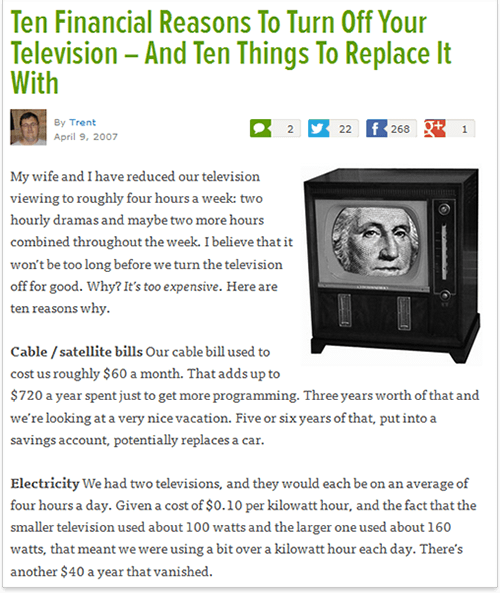
Now, think what things grabbed your attention most. Not taking the TV set into account, no doubt, the number one thing was the biggest heading.
Then, for sure, things that are written in bold or italic.
Well, Search Engines try so much to be like you and me, and they notice the same things, that is, headings and emphasized text.
I′ ll tell you a bit more about it.
First, headings, or more exactly, H1 and H2 texts
What′ s H1, H2 and so on? In HTML, headings and subheadings are marked with H1 to H6 tags, to define the size of your headings, like they appear to the user. So there′ re 6 levels of headings, H1 is the biggest, and H6 is the smallest. Normally, we put headlines, titles and other important things into H–tags.
The most substantial headings, I believe, are H1. In fact, Search Engines believe the same. It should be noted, however, that H2–H6 tags carry very little to no weight to Search Engines, but we design our page for users too, remember?
So here′ s your new winning step: add some keywords into your headings.
For H1 tags, use your major (green) keywords.
As for H2–H6 headings, take your "yellow" keywords — the ones we chose as optional. Don′ t forget to look up your personal On–page Optimization Report for more tips.
Second, bold and italic fonts
As I mentioned, Search Engines′ crawlers try to be as human–like as possible. And they believe that what′ s bold or italic is more important than simple plain text.
You know what I′ m driving at?
DO IT NOW! Try to emphasize your keywords: put them in H1 and H2 headings texts. Where you have prominent ideas on the page, express them using your keywords, and make this text bold or italic. Don′ t forget to make the changed pages available online.
Sure, WebSite Auditor gives you a hand with headings, bolds and italics, so you′ re absolutely safe.


Answer
Answer
Answer