

1.2 Choosing Keywords

In fact, we′ll carry out the keyword research in two steps:
- First, we′ll make a huge list of words to choose from.
- Then, we′ll sort them out and make a short list of the most profitable ones.
Here, I have a thing to tell you: as ever, there are options, both winning, to choose between.
First on every step, I describe a free but tedious way to get what you need. It′s free but it takes one or two working days each time you go through it. Still even if you′re going to save your time and stick with the faster option, you′d better not skip other pages. You won′t regret reading them, as you′ll have a great chance to learn how Search Engines and special SEO software work.
After that, I′ll get down to the faster option: a smooth keyword tool that makes keyword research a snap and also makes a lot of work for you at further steps.
So let′s start.
1.2.1 Getting keywords from everywhere and nowhere
Option 1: Free Keyword Research DIY
Make your first list of keywords
As of now, you have to exercise your brains a while. So get ready, it′s time for brainstorming. To start with, make a list of every word or phrase you can think of that people might use to find what your site offers. Ask anyone you can to give you ideas — you never guess what alternatives your colleagues can offer.
Just like my boss often searches for Search Engine marketing — and I prefer website promotion, any of your colleagues or friends may have a different idea of how your product can be found. If there is no one to ask, use Thesaurus to search for synonyms.
And, use an Excel spreadsheet to put each keyword as a separate record in it, as you′ll need to do some calculations later.
Think of some keyphrases
After you have a list of single words, think of keyphrases. Try to combine the words you have on your list, or add other relevant words that better describe your product or service. Again, ask your friends and colleagues for input and try to find people that are within your site′s target audience to get an idea of how they would search.
Also, take into consideration variations in terminology as determined by one′s age, profession, what part of the world they are from, and so on. Remember that there are often several ways of saying the same thing.
The simple example is headphones. My dad rather calls them headsets. And Mike often says earphones.
And, first and foremost, my advice here is:

Answers can come from most unexpected places. Want an example?
You already know about my son Mike. Now it′s time to introduce his younger brother, Andy. He′s 9 and I
call him an SEO genius.
Maybe I am cheating, but maybe I′m just a good father :) — you decide. The thing is, we sometimes play a
game.
I give him a word or a couple of words — and his task is to think of all possible word combinations that relate.
Yeah, I′m a practical guy :), but he gets some pocket money in return!
And you never guess what ideas this little cunning brain can have! I′d never coin such combinations with my 42–year
background.
Besides, it′s a way to develop Andy′s imagination. Maybe he′ll turn the #1 rich guy on the planet?
And the thing is: the fewer things people know about SEO, the better keyword ideas come to their minds.
Use the web to get more
Once you have a good starting list of 20–40 words, use Search Engine databases to refine it and see what people have actually searched for when looking for similar sites. Here′re the three most popular resources for doing that:
Google′s Keyword Tool — Quite a useful thing. Select to generate keyword ideas with Descriptive Words or Phrases. Enter a keyword for the start and go ahead to get a nice list of keywords.
The good thing about Google Trends is that it provides keyword data for a selected time period and thus lets you see which keywords are seasonal. As they say, forewarned — forearmed. Knowing when people search for your targeted keywords and when they don′t will help you foresee potential traffic (and, consequently, conversions and profit) drops and increases.
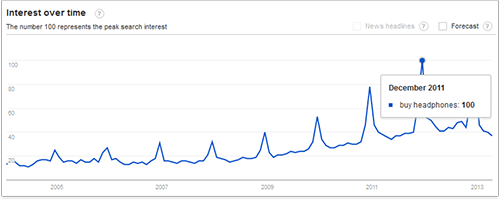 Google Trends for "buy headphones"
The results provided by the tool are also broken down by region, city, language, category and time range. On the screenshot above you can clearly see that most of all people search for headphones in December. This can be applicable to many e–commerce products, as in December we start looking for Christmas presents, don′t we?
Google Trends also has a "Hot Searches" feature that shows the top 10 queries in a selected region on a given date. Somehow, I am not surprised that guys search for "Halloween history" on October 31st, and "santa tracker" on December 25th
However, what we are currently interested in is the "Related terms" box, where you may get additional keyword ideas for your research.
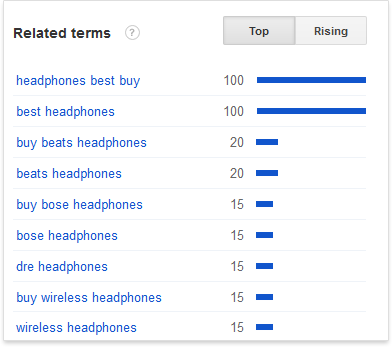
Related terms in Google Trends
My experience shows that this tool is useful for analyzing some very fresh keywords that have not so many searches and are neglected in Google AdWords Keyword Tool stats.
Wordtracker is a paid service for regular use, but it offers the benefit of a free version, which can be used to complete your keyword research if you are fairly organized.
Free Wordtracker is almost equally useful as the paid one. If you enter your main keyword, Wordtracker lists out suggestions for other popular search terms that contain that particular word or phrase. However, like any free tool, it has a few downsides. For instance, it won′t store your keywords for future use, it only gives you 100 suggestions and lets you get suggestions for just one word at a time.
Keyword Discovery can also be quite helpful, as long as it′s free. The drawback is again, that you can only ask for suggestions for one keyword at a time, and won′t be able to check more than 100 keywords daily. Besides, like the rest of free tools, it won′t store your keywords for the future
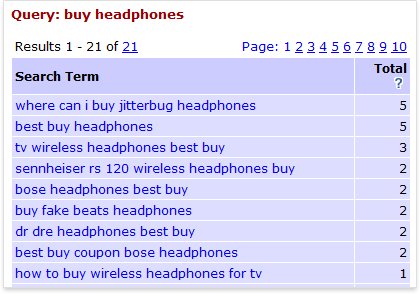
Keyword Discovery results
Übersuggest is another free keywords suggestion tool to help you expand your list of keywords.
SEMRush is a valuable tool too, especially if you have a subscription. Among other reports, it provides you with related keywords, and the list of domains that rank for this or that term.
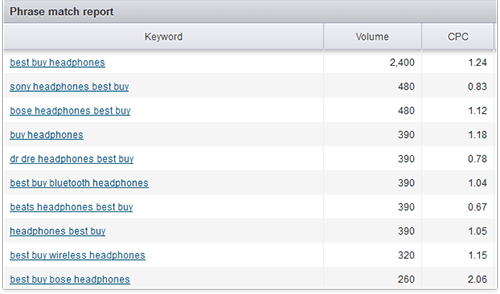 SEMRush results
Spy on competitors
Let us be honest: each SEO is a spy. As any marketers, we always keep an eye on our competitors to get more ideas. So don′t miss a chance to borrow some nice keywords from your peers.
One of the ways is to use the free Google Keyword Tool again. Choose some keyword phrase you′d like to use and enter it in Google′s search field. That′s a way to find the top websites you would have to compete with
Here′s an example of how it′s done:
Say, you sell headphones. First, type in buy headphones in Google to see who your main competitors are.
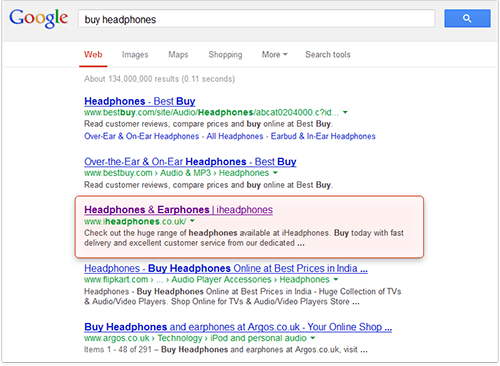 Top sites for the "buy headphones" keyword in Google
On the screenshot above you see your online competitors. To make the research more efficient, you may perform a quick examination of each of them to decide whether you ACTUALLY compete with it or not.
For example, we are definitely not interested in competing with Wikipedia (though, unfortunately, you′ll probably have to), and are less interested in peeping into the keywords targeted by a large e–commerce website where all types of products are sold (like Tesco, Amazon or Bestbuy.com). What we need are websites selling the range of products similar to yours. That′s why for deeper analysis we selected … wait for it … iheadphones.co.uk.
Now you copy this URL (http://www.iheadphones.co.uk/) to the clipboard, go to Google Keyword Tool, and instead of entering keywords, enter your competitor′s URL into the "Website" field.
Now wait a couple of minutes, and Google will surprise you with a great list of keywords your competition is using. How about noise cancelling earphones or in ears headphones? Might bring you visitors, too.
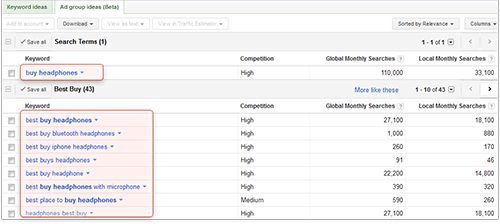 Google Keyword Tool
On the second tab (Ad group ideas) the ideas are sorted by groups (pretty obvious, right?), which allows you to quickly select the groups of products you offer and would like to promote.
Now check some more competitors the same way — and see how your keyword list grows bigger, with the new keyword ideas you′d never think of!
Another way to see what keywords are targeted by your competitors is to check their meta <keywords> tags. At the dawn of SEO it was believed that these tags had some influence on rankings. Therefore, SEOs began stuffing these tags with keywords they wanted to rank for. Of course, such manipulative tactics were quickly noticed by Google with the tags becoming unimportant, but some people continue filling them with keywords or simply do not delete the existing ones.
Whatever the reason may be, there are some meta keywords on Iheadphones.co.uk:
 Meta keywords
Now it′s your turn. Go to your competitor′s website main page, click Ctrl+U and there′ll appear a page with the source code, at the top of which you′ll see the desired Meta keywords tag. It can be found in the
, i.e. at the top of the source code page. You can either scan it yourself, or click Ctrl+F and start entering the word "keywords". After you enter a few letters, the tag will be highlighted.Put human mistakes at your service
By the way, it′s a good thing to consider misspelled keywords. Your SEO in Practice guide is the rare SEO book that will mention it, but that′s a great way to get new ideas without even using any special keyword tool.
Think of misspellings that may occur for the keywords you want to target. People do make mistakes when they type in search terms. And this does happen more often than you might think, believe me.
Want to check it yourself? Type gaurantee in Google. I′ve just checked and found 2,720,000. Those are the smart guys! Or even better, try sports equiptment. Brings 7,390,000 results! So as you see, people do misspell words, use them on their sites, optimize for them and get a good portion of traffic
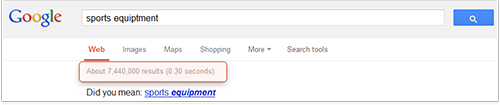 Misspelled keywords results
Now come on, let′s make a "Welcome" sign for all absent–minded guys: use a couple of misspellings on your site — and you′ll get your portion of traffic.
So keep misspelled keywords, since if you misspell them, others might do the same and find exactly your page. And, for the time being, just put misspellings on your list.
Everyone loves the local guy!
It′s sometimes very useful to localize your keywords. For instance, a guy from Bronx won′t search for simply car wash. He will type in car wash New York, or even more likely car wash Bronx. So if you optimize for a localized term, you′ll get more visitors who want to get what you offer exactly where you offer.
Therefore, if your business location matters, what you have to do now is, create keyword combinations with local names.
Tiny variations make a great matter
Most Search Engines (like Google and Yahoo!) make a distinction between singular and plural forms, as well as stemmed variations — gender forms, or "–ing", "–ed" forms.
So don′t forget it may be very useful for you to target different forms of the same words as well. It′ll bring some portion of searchers to your site.
Maybe not that many of them, but as long as you make a sale, it′s worth the effort.
Like, if your main term is birthday cards, it′s wise to consider birthday card as well. Come on, type these terms in Google! You get 140,000,000 results for birthday cards — and 232,000,000 for birthday card. Now, if you optimize for both terms, you′re the smartest!
Now the talk comes to using software for keyword research — that′s for getting new keyword ideas, checking how profitable they′ll be and tracking positions of the already selected ones. So go ahead, your SEO book shows you how simple and fast it can be with a brilliant keyword tool.



Answer
Answer
Answer
Answer
Answer
Answer
Answer
Answer
Answer
Answer