
Register
Forgot Password?
Score
-
-
-
  /100
Certificate
SEO Certificate


Share

Option 2: One click to choose the best keywords

Yes, the time comes to see how keyword software makes the final decision swiftly and gracefully. So I′m anxious to say, it′s already there. Rank Tracker is done with keyword research — and with the choice as well

Let′s have a look. On the right of the keyword tool′s window, find the combo box with workspaces and choose Keyword Research View. Now you can see a column with KEI. In this column, the tool has put a color marker for each word, ranging from green to red.
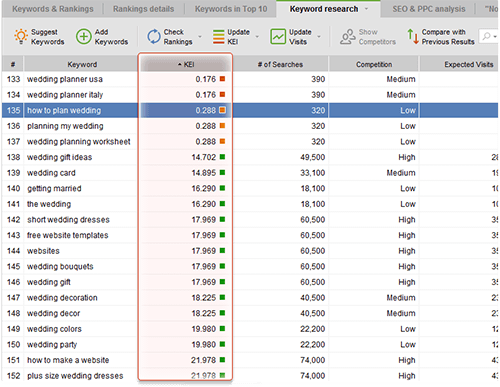
Keyword Efficiency Index in Rank Tracker Keyword Efficiency Index in Rank Tracker

So, What′s KEI and Why Do We Need It?

As I already told you, KEI, or keyword efficiency index is an SEO know–how. It shows you how good a keyword is for bringing traffic to your site. Or, putting it simple, how much positive effect keywords have on your paychecks.

You need keywords with high KEI. The greener the marker is in Rank Tracker, the better the keyword. So just sort keywords by KEI (click the header of the column), and separate the best keywords from non–worthy ones. And, you can just remove the keywords with bad KEI.
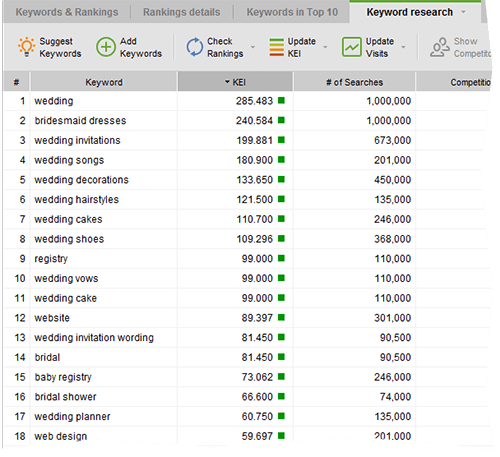
In the beginning choose keywords with 'green' KEI In the beginning choose keywords with "green" KEI

But WAIT! There′s more…

Potential traffic

Rank Tracker does not only let you estimate KEIs in a click of mouse, but also calculates how much visits this or that keyword may bring to your website i.e. how profitable a ranking for a particular keyword will be. Go check the Expected visits tab and make your choices!
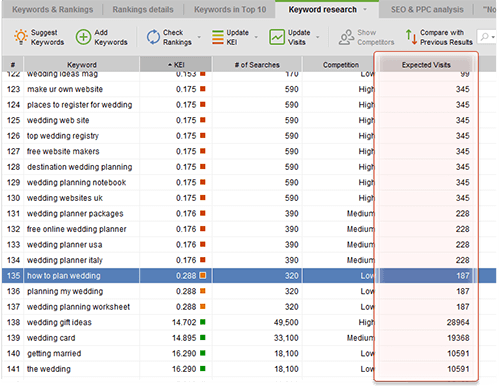
Potential traffic Potential traffic

Eventually you′ll be left with 100–130 keywords. First, pay attention to the top 5 ones. You′ll use them a lot to optimize your website. The next 30 will be a good alternative, say, to create variations. Then, the remaining terms are good enough and should be there just in case.

DO IT NOW! Calculate KEI for your keywords, sort them out and choose 5 best keywords, 30 alternative ones, and leave 65 more to create more variations.

Let′s sum it up. You will hardly realize it at the moment, but now you have a list of premium quality keywords that are worth a fortune. As a next step, we′ll check where your site ranks for these words. To put it simple, let′s find our starting point.

105 comments

Add comment Hide comments

Comments page:
#1660 2010-11-10 12:19:50 Thomas Graf

Thanks Dan. I received a message from your colleagues in the meantime that there was a technical problem with Google some days ago which is solved now.

Answer
#1661 2010-11-10 12:23:10 Thomas Graf

I would still be interested in the logic behind your advise to build keyword combinations such as "Wedding Australia".

If your main keyword is "wedding" and if "Australia" has a high KEI - why should "wedding auctralia" also have a high KEI and therefore be used to optimize a webpage?

I can build beautiful combinations of my main keyword with other high-KEI-keywords, but the combination doesn't help at all if no one searches for it.

Do you see it differently?

Thanks you and best wishes
Thomas

Answer
#1663 2010-11-10 12:48:02 Dan Richmond

Well the point was that the main keyword is "wedding", but since it has insane competition you would want to narrow it down to "wedding Australia", because Australia is where you do business and it's your market. At the same time "wedding Australia" turned out to be a high search volume keyword, that is why it is a high-KEI one. Not just any combination will work but the one that specifies a general competitive keyword the way that reflects the actual people's needs.

Answer
#1664 2010-11-10 17:54:38 Thomas Graf

Thanks Dan. But still your approach confuses me.

You say that we should choose keywords with high KEI because here the search / competition ratio is good.

But that doesn't work: If for instance your website is in the education sector, according to your logic you would simply take UNIVERSITY as keyword and use it again and again. It has a super KEI.

This is how I understand your logic ("use page ranker and take the first 5 key words"). But your website will not get among the top-100 even though you used a keyword with high KEI.

Instead it may make sense to use other keywords with LOWER KEI but more specifically related to your content. But this other factor "specific relatedness" is something that no one can tell you. You have to be creative and combine keywords so that they are specifically related to your site - then check their KEI and take those with the highest - and hope that it works. But the KEI itself doesn't seem to help me at all.

So the logic - simply take the top KEI keywords - doesn't seem to make sense. Could you explain more what you mean, please?

Thomas

Answer
#1671 2010-11-15 09:40:58 Dan Richmond

I do not really insist on taking ONLY the high KEI keywords. What I wrote in the previous chapters is "localize your keywords" and "make sure they are specific to what you sell". Surely specific and localized keywords have lower KEI than the general ones. Simply the "free ecard" example already contains specific keywords and at the same time they have high KEI. If I insisted on taking ONLY the highest KEI keywords then I would suggest to optimize the free ecard website for "sex" and "cars" in this chapter :) The idea is to generate a list of relevant, specific, narrowed-down keywords, and then check their KEI, choosing the highest-KEI ones for your site.

Answer
#1672 2010-11-15 10:37:00 Thomas Graf

Makes sense. Thank you for clarifying!

Answer
#1647 2010-10-29 10:19:33 Thomas Graf

Hi everybody,

unfortunately I still have not received an answer. I tried it again today - it is even worse.

I have a list of keywords and I click on "Update KEI" - after I have marked keywords. But then I only get the message that the KEI for these keywords has been updated.

But I don't see any KEI... :):):)

Please help.

Answer
#1659 2010-11-10 12:15:53 Dan Richmond

You should switch your workspace (top right) to "Keyword research view", please try that.

Answer
#1645 2010-10-28 20:58:20 Thomas Graf

Hi Dan,

sorry, I don't get the page ranker. How do I get the KEI and KEEP it available?

If I click on SUGGEST then I get the KEI list in a separate window. But if I continue, it calculates the ranking (which actually doesn't work, see my other comment) and I can't see the KEI list anymore.

Then when I click FINISH this window closes again.

Then I again I can't see the KEI list with the green, yellow and red boxes.

Please help...

Answer
#1608 2010-10-14 08:03:49 Maxim Terehovich

You need to add page rank of top site to this formula to understand what you can do with list of keywords

Answer
#1454 2010-08-31 16:57:27 Ivo Ignatov

Hey guys

Is it not too much competition (715000) for those keywords to appear in green?

Answer
#1458 2010-09-01 10:53:25 Dan Richmond

Well, if the number of searches is so big that it "outweighs" the petition then yes, it can have a good KEI score. Basically good KEI for very competitive keywords means that although the competition is very tough and you will need a huge budget to be on top for that keyword, BUT once you're on top the revenues will be most rewarding.

Answer
#1489 2010-09-05 10:27:40 Ivo Ignatov

Thanks Dan.
Now I see. :)

Answer
#1385 2010-08-12 20:00:30 Leon Danilov

Hi Dan!
At first, thank you for so interesting and clear information.

my question is.
Why search queries of my site in google webmaster tools and list of keywords in Google's Keyword Tool relating то the same site is different? How Google's Keyword Tool defines the list of keywords of the site?

Answer
#1145 2010-04-08 11:16:44 Dave O'Riordan

Sorry about that I Jumped the gun!! sorted..

Answer
#1144 2010-04-08 11:14:19 Dave O'Riordan

Hi Dan
I'm plodding through the free edition of Rank Tracker and am wondering if the "Keyword Research View" only operates in the paid for version as when I select it nothing happens.

Answer
#1125 2010-03-31 01:21:15 Noman Ahmed

Thanks for interesting tools

Answer
#933 2010-01-05 10:33:26 Dan Richmond

@Paul Wallace

Hi Paul,

no, it's not connected with the demo version. Could you contact the developer's support with that problem? I am sure that they will help. Please go here to submit a support ticket:
http://www.link-assistant.com/support/

Answer
Comments page: