

Option 2: Link building at ease – your personal LinkAssistant
There′ s a brilliant SEO tool that was specially designed for link building campaigns: LinkAssistant. That′ s the #1 choice of thousands website owners from all over the world — and they all say this program makes SEO tasks easy–to–do even for the most non–savvy guys.
I use it for my link building, too, and here I′ ll tell you how you grow your links and manage your link building campaigns with the software without the usual effort. But even if you′ re not planning to use any software, read the next pages and you′ ll learn a lot of useful stuff about link management.
So download LinkAssistant and let′ s get started.
Honestly, I don′ t know a single person who′ d do all link building tasks by hand these days. People save their time for better things, while link building activities have become a no–brainer with the right software at hand. And if you′ re ready to check out what′ s quick and efficient link building, I′ m gonna teach you how to use LinkAssistant the best way.
Step 1. Find potential partners for your site
Again, your work starts with looking for new partner websites. LinkAssistant is rich to offer you six different ways to look for potential backlink partners. Let′ s look closer at some of them.
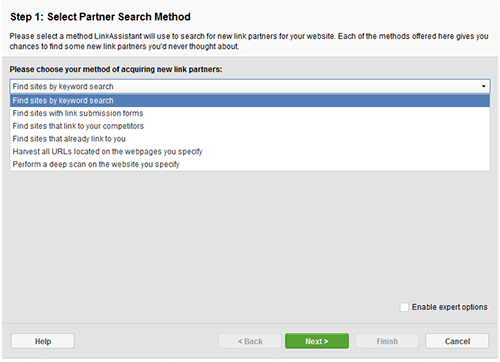
Partner search methods in LinkAssistant
I′ d start from the first option: Find sites by keyword search. Here you′ ll have to enter your keywords. Save your time and effort, enter at least one keyword related to your business, so that the tool doesn′ t offer you to target irrelevant websites.
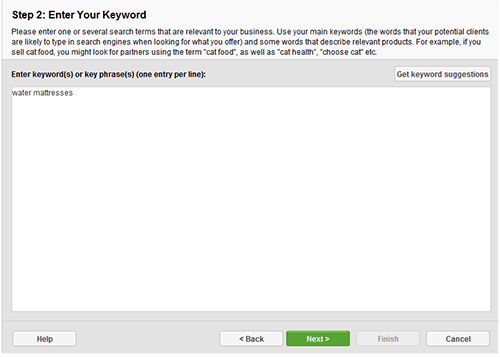 Keyword form in LinkAssistant
After that, wait a while till when the software comes up with a massive list of potential partners, look through the list and mark the websites you′ d like to work with.
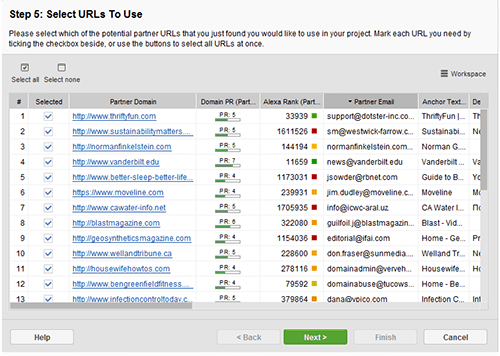 List of found partners
If there′ re websites you didn′ t select, LinkAssistant will ask you if you want to "blacklist" them.

If you′ re sure you won′ t be dealing with these partners in the future, hit "Yes" to put them into a blacklist — and the software won′ t suggest them anymore. Just in case: if you′ ll wish to remove them from the blacklist later, you can do this in the software preferences.
Now let′ s see how other ways to search for partners will help.
Find sites that link to your competitors
The idea is simple, look at this example to understand.
Let′ s say you sell water mattresses. Your #1 competitor sells water mattresses, and sites that link to that guy might pretty well link to you. You just need to find out who these sites are and contact them.
Perform a deep scan on the website you specify
That′ s the shotgun method as they call it. You take a site and dig into it to find each and every URL it′ s linking to.
Then we′ ll see if these sites are worth getting links from.
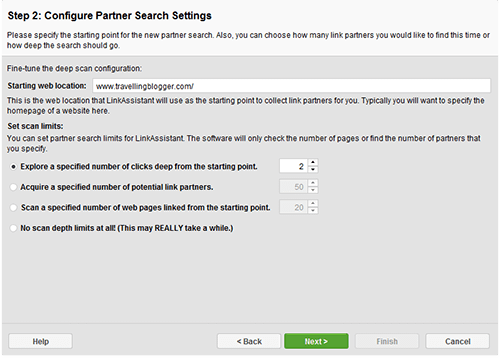 Configure Partner Search Settings in LinkAssistant
Step 2. Contact potential partners and keep records
As I mentioned before, keeping records of your existing and potential partners is crucial. As soon as you figured out what links you want to have, it′ s time to contact website owners and discuss whatever ways to get a link you want.
And here LinkAssistant gives you a hand again. You′ ve got the Partner Email column. Where possible, the tool will extract websites′ contact data and arrange it neatly for each link. That speeds up your link building: you don′ t have to dig for contacts — just use email addresses you see here.
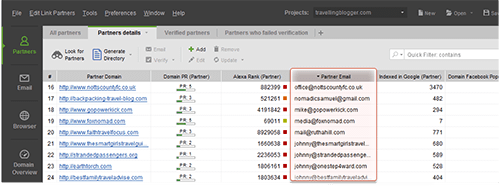 Backlinks management in LinkAssistant
And I guess the next question like this will be natural: And how do I evaluate the quality of all the links I find?
Sure there is a solution: your personal software tool to search for high–quality links.
This is SEO SpyGlass. You can download it right now and we′ ll look at it together.



Answer
Answer
Answer
Answer
Answer
Answer
Answer
Answer
Answer
Answer
Answer
Answer